
If you need the assistance of our Audio/Visual or Video Production Teams, please make arrangements ahead of time as requests may not be as easy as you think due to the specialized equipment that we use.
We request that any media that you need to use for Saturday services be emailed to us at dobson.joshua@gmail.com by Thursday at 5pm.
Please review the following table for requirements and restrictions of media content requests for Saturday services.
| Media Type | Formats Accepted | Restrictions |
| Music | .mp3 or CD | For liability reasons, we do not play music off phones or other personal equipment. We do not have equipment to play cassette tapes. |
| Video | .mp4, .mov, or DVD | We do not stream directly from YouTube, so if you need to play a video that is online, please email that request by Friday by the deadline listed above. We do not have equipment to play VHS tapes. |
| Streamed Media | YouTube, Spotify, etc. | We do not stream directly from the internet, so if you need to use streamed media, please email that request (if OK’ed by the Music Coordinator) by the deadline listed above. Any requests on Saturday for streamed content may be rejected. |
| Slides | PowerPoint, Keynote, or Google Slides | Do not embed fonts into your presentation. If you have a specialized font, please email the font file with your presentation or export your presentation into high resolution JPEG format and import slides into another presentation. If you need to use your own laptop, we can hook up using HDMI or Apple Thunderbolt. If you have your own adaptor, it needs to work with HDMI. |
| Photos | .jpg or .png | Please provide photos with good resolution that will be clear using our projector. |
| Recording | Any Format | Due to copyright licensing issues, it is our policy not to provide recordings, especially music. Sermons are normally available afterward in our Media section on our website or on Vimeo as we have purchased the proper licenses to provide them. From time to time, we do invite guest musicians and vocalists to perform at our church. Please respect their copyrights and refrain from recording when requested. |
We understand that you may not be able to make it to church early, but understand that we have a lot of moving parts to make sure we are prepared for our weekly services. With that said, we ask that you please provide your media to the AV Control booth no later than 10:35am on Saturday.
Most household computers have the ability to rip music off of your CDs, so if you have a computer at home, please try and convert the music file ahead of time into MP3 format and email it to us. As a backup, you may want to still bring your CD.
Recording/Streaming Policy
By law, we cannot record or stream any live performances that require the use of pre-recorded music such as backing tracks without the direct permission from the original performer/writer. We are only able to stream or record fully live musical performances where the music is played live. With that said, any performances in which pre-recorded music is used, we will not be able to stream any audio or videos. The music that we use for our live streaming services has been granted by the original performer/writer.
We apologize for any inconvenience, but we are trying to comply with the guidelines of our CCLI licenses.
We don’t mean to sound picky, but there is a significant amount of concentration and coordination by the Audio/Visual & Video Production teams that takes place in those 15 minutes before services start to make sure we have everything in place so that we can run the AV for the church service and live streams. We appreciate your efforts in respecting these policies.
Thank you,
The Gainesville Audio/Visual & Video Production Team
CCLI# 3275544 // CSPL 128912
The AV Team
|
Managers: ability to staff and manage the control room independently and fill in where needed. Josh Dobson – AV Operations Manager
|
|
Level 4 Tech: ability to install and configure presets to all equipment and has a full understanding of the inputs and outputs of all stations. Josh Dobson
|
|
Level 3 Tech: can independently operate all 3 stations and perform start-up and shut-down operations. Juan Henriquez
|
|
Level 2 Tech: can operate at least 2 of the 3 stations proficiently and at the same time (i.e. audio and visual). Emma Dobson
|
|
Level 1 Tech: in training, learning how to proficiently use one station in the control room.
|
|
Assistants: aid the department in start-up and shut-down operations of the equipment, replenishing batteries, and placement of microphones |
The AV Stations
|
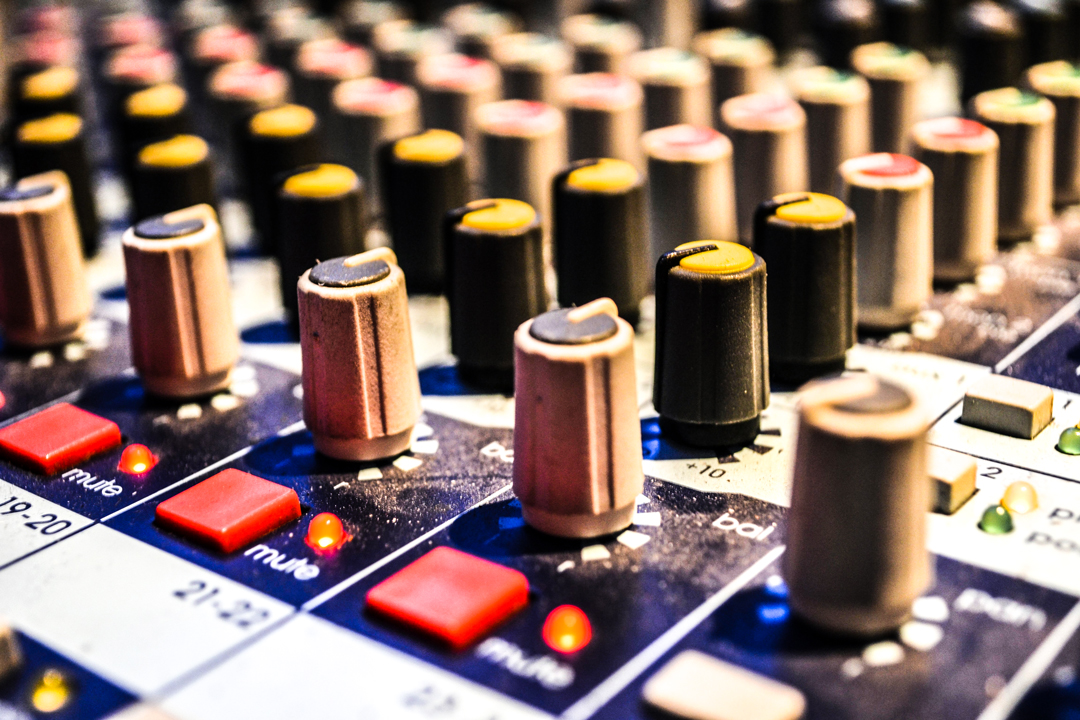
Audio: Sound Board Running the audio takes concentration and the ability to anticipate where the sound is going to come from next. This station also requires a good ear to provide a pleasant mix of sound to both the live audience, but also those streaming the service. Audio is normally the first phase of training our technicians. |
|
Visual: Presenting & Projection Our system utilizes ProPresenter to manage all of our projected visuals. Running the visual station requires knowledge of how to use a computer and software with the ability to stay focused on not only what is on the screen, but what needs to come up next. A Level 2 technician should be able to run Audio and Visual independently at the same time. |
|
Video Production: Streaming & Recording Our system utilizes a 3 remote camera system through an ATEM studio and WireCast software. Running the Video Production station takes an understanding of camera angles and the ability to multitask within multiple softwares at the same time. |
|
Equipment: Maintenance & Operations We utilize multiple Mac computers, a Midas M32 sound board, Blackmagic ATEM video switcher, and multiple remote video cameras. In order to keep our equipment functioning properly, we only allow trained individuals to work on the equipment, which includes start-up and shut-down operations. |
|
Configuration: Software & Hardware This is the duty of either a Level 4 tech or a hired professional. This job entails adjusting the presets that can be accessed in the department by those that do not have an advanced knowledge of the software or hardware. |
How To Address Our Microphones
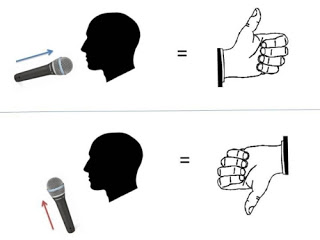
Most of our microphones are “top-address” which means sound will not pickup if you are talking into the sides.
For the benefit of the sound techs and those streaming online, please make sure you talk directly into the top of our microphones.
A/V USE POLICY
Sound and video equipment can be very sensitive and it takes a lot of invested time to make everything run smoothly.
With that said, we have 3 simple policies:
- If you need the use of A/V equipment but are not part of our A/V team…PLEASE, ask for help. Really, we are here to help and teach.
- If you are going to host an event where you need the use of A/V equipment, it is your responsibility to arrange that an A/V tech can be on site ahead of time. Note that there may be a cost associated with this service.
- Please do not wait until you are within 24 hours before your event to request help from the A/V team. We understand that situations can come up…but on the flip side, there are also situations that come up where we can’t help at the last minute too.
We love what we do and are more than wiling to help out, but please be respectful of our time with our friends and family as well.